
The bag from the screenshot, in your store.
Bags and accessories are bought on looks: the shape, the leather, the clasp. Shoppers find them on social media without a brand name, and accessories are usually the last thing anyone searches for. Koral lets the image do the searching.
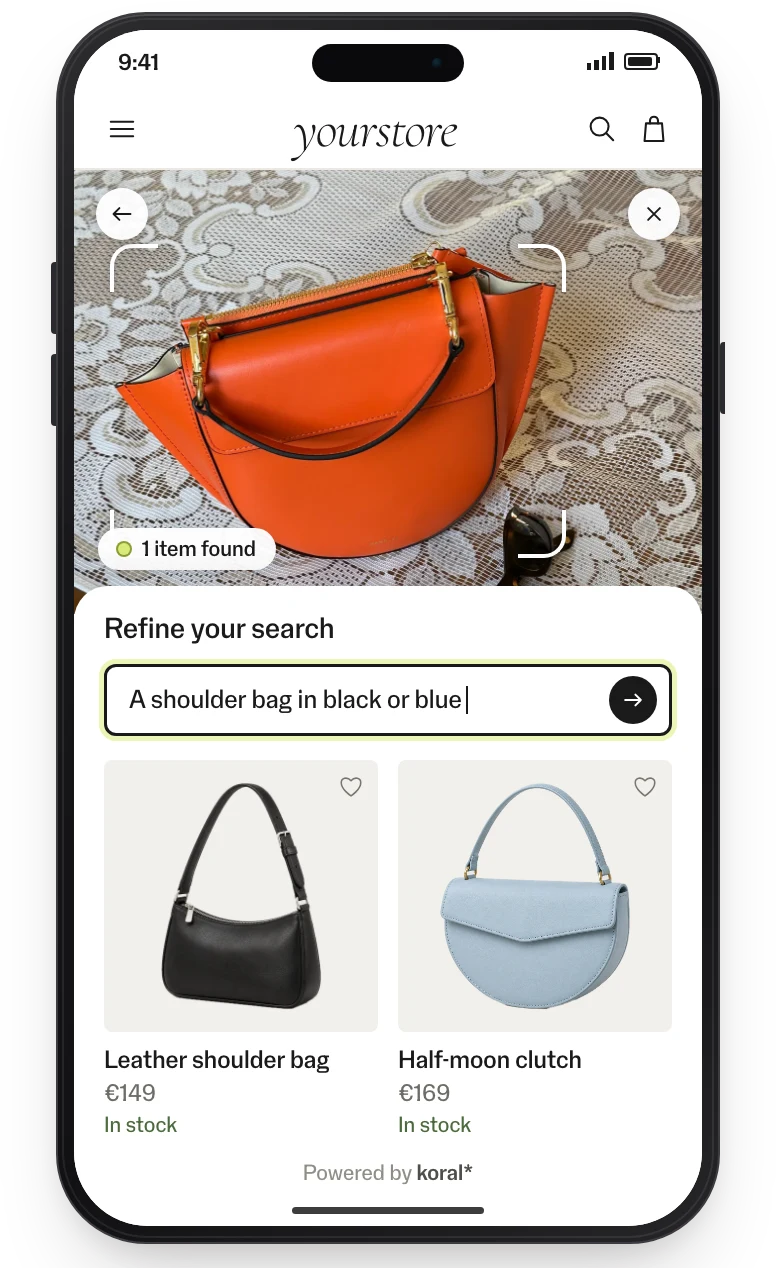
From the photo to the finishing touch.
-
They have a screenshot, not a product name.
01 / 05Image searchKoral detects the bag in the photo and finds it in your range. Words narrow the result: “a shoulder bag in black or blue”.
- Search bar
- Product page
- Assistant
-
Text can’t describe a shape or a clasp.
02 / 05See similarSee similar on every product card and gallery image shows the bags that look most alike, all in stock.
- Listing page
- Product page
-
They want to compare before they choose.
03 / 05Related productsThe closest visual alternatives as a row on the product page, so comparing doesn’t mean searching again.
- Product page
-
The model wears a bag, a belt and sunglasses, and only the dress is linked.
04 / 05Shop similar lookOn model images, Koral finds every piece the model wears, the bag and the accessories included.
- Product gallery
-
Accessories are found last, if at all.
05 / 05Bundles & Finish the lookAccessories go into the outfits Koral builds around each product. You set how many, along with colour contrast, brand mix and price span.
- Product page
- Basket
- Mail flow
Measured on live sites.
Conversion in sessions that used visual discovery, 5× the site average of 1.6%.
Higher conversion than the site’s other product carousels.
From the clients’ own analytics, A/B-split where possible.
Implementation: this is all it takes.
No model to train, no tagging, no CMS work. The product feed is the only input; the rest is a tag or an endpoint.
Feed connected
CSV, JSON or your platform feed. Koral indexes every image, in any language and any category.
Tag or endpoint wired
Add the tag through GTM, or call the endpoints from your own components. Your design, your markets.
Live and measured
Pilot on one category, A/B-split, with events in your analytics. Then roll out market by market.
99.9% uptime SLA. The script is served from a global CDN; requests are processed in the EU. Koral keeps nothing from shoppers: photos and data are used for the request and not stored. A data processing agreement (DPA) comes with every contract.
Frequently asked questions.
Yes. The shopper draws around the bag, and the rest of the photo is ignored.
Yes. They add “in brown” or “cheaper”, and the results update without a new photo.
Yes. Bundles and Finish the look include accessories, and you decide how many.